
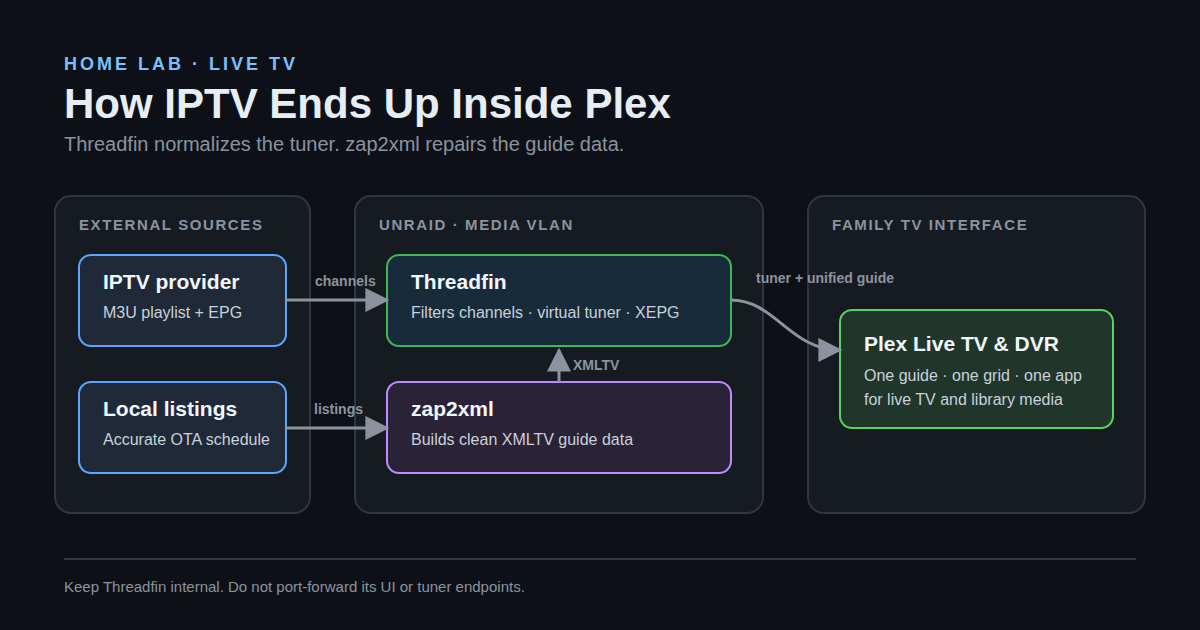
I wanted one television interface in the house. Not one app for our Plex library, another app for live television, and a third app that looked like it had been designed for a gas-station tablet in 2014. Plex was already where everyone watched movies and shows, so live TV needed to appear there too.
The IPTV provider gave me the two things most providers give you: an M3U playlist and an XMLTV guide. The playlist worked. The guide technically existed, which is about the nicest thing I can say about it. National channels were inconsistent, local channels were worse, and some streams had no useful guide match at all.
The final setup uses three pieces:
- Threadfin turns the provider’s M3U playlist into a tuner Plex understands.
- zap2xml builds accurate XMLTV data for my actual local television market.
- Plex DVR consumes Threadfin’s virtual tuner and unified guide.
The result is live IPTV in Plex with the same grid, search, favorites, and DVR interface the family already knows.
This assumes you have an IPTV subscription and are authorized to use its streams. I am deliberately leaving provider names, credentials, and playlist URLs out of this write-up.
Why Plex Needs a Middleman
Plex does not accept an arbitrary M3U playlist as a Live TV source. It expects a supported tuner, normally something like an HDHomeRun.
Threadfin sits in the middle and handles that translation. It reads the M3U, filters the giant provider lineup down to channels I care about, maps those channels to guide entries, and presents itself to Plex as a network tuner.
The flow looks like this:
IPTV provider M3U ───────────────┐
                                 │
National XMLTV sources ───────┐  │
                              ▼  ▼
Local listings → zap2xml → Threadfin/XEPG
                              │
                              ├── virtual tuner
                              └── unified XMLTV guide
                                      │
                                      ▼
                                  Plex DVR
Threadfin is not just passing the playlist through. It is the normalization layer between a provider lineup that changes whenever it feels like it and Plex, which wants stable channel numbers and stable guide identifiers.
The Containers
Both Threadfin and zap2xml run as Docker containers on Unraid. Plex is a container there too.
Why Plex and Threadfin Have Their Own VLAN
The extra network configuration in my setup is intentional isolation, not something Plex or Threadfin requires.
I run the Plex container on a dedicated media VLAN instead of placing it directly on my normal LAN. Threadfin lives on that VLAN too. Each container gets its own address, Threadfin listens on port 34400, and Plex sits beside it on the same subnet. That keeps the media services away from laptops, phones, management interfaces, and the rest of the trusted network while allowing Plex and Threadfin to communicate directly.
The firewall policy is deny-by-default between the media VLAN and my other internal networks. I only allow the flows the stack actually needs:
Trusted client networks  ── TCP 32400 ──> Plex
Trusted admin network    ── TCP 34400 ──> Threadfin UI
Plex                     ── TCP 34400 ──> Threadfin tuner and XMLTV
Plex and Threadfin       ── outbound ───> required internet services
Media VLAN               ── blocked ────> everything else on the LAN
The exact outbound policy depends on how tightly you filter egress. Plex needs its normal authentication, metadata, and update access. Threadfin needs the provider playlist, guide sources, and IPTV streams. Neither service needs broad permission to initiate connections into the trusted LAN. My media library is bind-mounted from the same Unraid host, so Plex does not need a network file-sharing rule; if your library is on a separate NAS, add only the required SMB or NFS flow to that specific host.
Putting Plex and Threadfin on the same VLAN also avoids relying on multicast or SSDP discovery across routed network boundaries. Plex can reach Threadfin directly at its media-VLAN address. If discovery still fails, the Threadfin address can be entered manually during Plex DVR setup.
This is the bridge-network shape of a Threadfin Compose definition:
services:
  threadfin:
    # Pin this to a tested image tag or digest before treating it as production.
    image: fyb3roptik/threadfin:latest
    container_name: threadfin
    ports:
      - "34400:34400"
    environment:
      - TZ=America/New_York
    volumes:
      - /mnt/user/appdata/threadfin:/home/threadfin/conf
      - threadfin-temp:/tmp/threadfin
    restart: unless-stopped

volumes:
  threadfin-temp:
I use an Unraid custom network tied to the media VLAN instead of the published ports section. Do not use the ports example and a dedicated custom-network address as though they are the same deployment. With the custom network, each container has its own media-VLAN address and the firewall controls which other VLANs can reach it.
The Simpler Same-LAN Option
You do not need VLANs to make any of this work. If your home network is flat and you are comfortable keeping the services on your regular LAN, use ordinary Docker bridge networking and publish Threadfin’s port as shown above. Plex then connects to the Unraid host’s LAN address on port 34400:
http://UNRAID_LAN_IP:34400Alternatively, put both containers on the same user-defined Docker network and address Threadfin by its container name. The only hard requirement is that Plex can reach Threadfin’s tuner and XMLTV endpoints. Remember that localhost inside the Plex container refers to Plex itself, not the Unraid host or the Threadfin container.
A flat-LAN deployment is easier and perfectly reasonable for many home setups. The tradeoff is that every device on that LAN may be able to reach Plex and Threadfin unless the host firewall says otherwise. My VLAN design adds complexity because I wanted containment, not because IPTV integration demanded it.
Do not port-forward Threadfin in either design. Its web UI and tuner endpoints can expose playlist and guide information. On my isolated design, only Plex and trusted admin clients can reach it; a media VLAN is not automatically a trusted network.
zap2xml is even smaller:
services:
  zap2xml:
    # Pin this to a tested image tag or digest before treating it as production.
    image: ghcr.io/jef/zap2xml:latest
    container_name: zap2xml
    environment:
      COUNTRY: USA
      POSTAL_CODE: YOUR_ZIP_CODE
      TIMESPAN: "168"
      SLEEP_TIME: "21600"
      OUTPUT_FILE: /xmltv/xmltv.xml
      TZ: America/New_York
    volumes:
      - /mnt/user/appdata/zap2xml:/xmltv
    restart: unless-stopped
TIMESPAN=168 asks for seven days of listings. SLEEP_TIME=21600 makes the container rebuild the file every six hours. The output lands at /mnt/user/appdata/zap2xml/xmltv.xml on the Unraid host.
Those latest references are intentionally labeled as quick-start placeholders, not a production update policy. For a long-lived setup, pin a tested image tag or digest and update it deliberately. The live system was running Threadfin 1.2.37 when I validated this write-up.
One Unraid-specific note: make sure the container’s documented UID/GID settings and the host appdata permissions agree. The User Scripts job also needs write access to Threadfin’s data directory. A guide pipeline that works only as root is an outage waiting to happen.
Step 1: Load and Filter the Provider Playlist
In Threadfin, add the provider’s M3U URL under Playlist. Do not put the URL in a blog post, screenshot, Git repository, or support ticket. Most provider URLs contain the account identifier and password directly in the path.
The raw playlist is much larger than what I want Plex to see. I created Threadfin filters around the provider’s group titles, including:
- the main US entertainment group
- US sports
- local channels for my market
- a few event channels
I then disabled duplicate, low-quality, and unwanted channels in XEPG. Stable channel numbers are useful here, so I gave each group its own range instead of allowing provider changes to reshuffle the entire lineup.
On the current system, the provider playlist contains 130 candidate streams. Threadfin publishes 41 channels after filtering and mapping. That is a much nicer grid than dumping the entire provider catalog into Plex.
Step 2: Stop Trusting the Provider’s Local Guide
The provider’s local-channel guide data was bad. Stream names did not consistently match XMLTV identifiers, some callsigns were wrong, and some local entries were generic enough that automatic matching had no chance.
zap2xml solved this by generating listings from the actual local lineup for my ZIP code. The current file contains 33 local stations and subchannels with roughly 8,700 program entries covering seven days.
That gives me a much more reliable local guide for my lineup, independent of whatever the IPTV provider decided to call a stream that week.
In Threadfin, I added multiple XMLTV sources:
- general US guide data for national cable channels
- the provider-compatible guide where it was useful
- the local zap2xml file for stations in my market
Threadfin’s XEPG mapper combines them. National channels map to the general guide. A provider stream such as the local NBC affiliate maps to the matching zap2xml station ID. Threadfin then emits one clean threadfin.xml file for Plex.
The manual mapping is the part that matters. A channel’s stream and its guide record do not need to come from the same vendor. Threadfin lets the video come from the IPTV playlist while the schedule comes from a completely different XMLTV source.
Step 3: Hand zap2xml’s File to Threadfin Safely
zap2xml writes its guide in one appdata directory. Threadfin stores imported XMLTV sources in another. I use a small script to copy the completed file into the local source Threadfin expects:
#!/bin/bash
set -euo pipefail

SOURCE="/mnt/user/appdata/zap2xml/xmltv.xml"
DEST="/mnt/user/appdata/threadfin/data/REPLACE_WITH_THREADFIN_XMLTV_ID.xml"
TMP="${DEST}.tmp.$$"

trap 'rm -f "$TMP"' EXIT

if [[ ! -s "$SOURCE" ]]; then
  echo "ERROR: source XMLTV file is missing or empty: $SOURCE" >&2
  exit 1
fi

if [[ "$DEST" == *REPLACE_WITH_THREADFIN_XMLTV_ID* ]]; then
  echo "ERROR: set DEST to the local XMLTV file used by Threadfin" >&2
  exit 1
fi

if cmp -s "$SOURCE" "$DEST"; then
  echo "$(date -Is) XMLTV guide already current"
  exit 0
fi

cp --preserve=timestamps "$SOURCE" "$TMP"
chmod 0644 "$TMP"
mv -f "$TMP" "$DEST"

echo "$(date -Is) Synced zap2xml guide into Threadfin"
Use the host-side filename that corresponds to the local XMLTV source shown in Threadfin. Threadfin may assign that source an internal ID, so do not copy the placeholder literally.
There are two details in this script worth keeping:
cmpavoids rewriting the destination when nothing changed.- copying to a temporary file and renaming it prevents Threadfin from reading a half-copied destination file.
That does not prove zap2xml had completed writing the source at the instant the copy began. Run the handoff after the producer’s normal update window, and if you make this more aggressive, validate the XML or add an explicit producer-completion signal before replacing Threadfin’s copy.
The Unraid Cron Trap
My first version used crontab -e and ran the copy every six hours. It worked until Unraid rebooted. Unraid builds much of its runtime filesystem at boot, so a hand-edited root crontab is not persistent.
The correct fix is to create the sync as an Unraid User Scripts job and assign it a custom schedule:
15 * * * *That runs at 15 minutes past every hour. The script only writes when the source changed, and an hourly check avoids having to perfectly align two containers whose update timers may start at different times.
The User Scripts configuration lives on the flash drive and is restored when Unraid boots. This is not just theoretical: while validating this post, I found that the old cron entry had disappeared after a reboot even though the script itself was still present. I moved it into User Scripts, ran it manually, and verified the zap2xml source and Threadfin destination had identical SHA-256 hashes.
Step 4: Build the XEPG Lineup
Once the playlist and XMLTV sources exist, the work moves to Threadfin’s XEPG screen.
For each channel I actually want in Plex:
- enable the channel
- assign a stable channel number
- select the best XMLTV source
- map the channel to the correct guide entry
- fix the display name and logo if needed
Do not trust automatic mapping for local channels. Match callsigns and market information, not just network names. There are many NBC, CBS, ABC, FOX, and PBS affiliates, and the wrong match can look plausible while showing an entirely different city’s schedule.
After mapping, trigger an XEPG update and check Threadfin’s logs. A healthy run should parse each XMLTV source, update the mapping database, and create both:
/home/threadfin/conf/data/threadfin.m3u
/home/threadfin/conf/data/threadfin.xml
The M3U is Threadfin’s filtered output. The XML file is the stitched guide Plex will use.
Step 5: Add Threadfin to Plex DVR
In Plex, go to:
Settings → Live TV & DVR → Set Up Plex DVR
Plex may discover Threadfin automatically as a tuner. If it does not, enter the Threadfin address manually:
http://THREADFIN_IP:34400When Plex asks for guide data, choose XMLTV and provide:
http://THREADFIN_IP:34400/xmltv/threadfin.xmlFinish the channel mapping, save the DVR, and let Plex refresh the guide. Plex Pass is required for Plex’s Live TV and DVR features.
My validated configuration has Plex reporting Threadfin as alive with one available tuner and uses the Threadfin XMLTV URL as a custom lineup named My Guide. In my installation, Plex is configured to refresh that guide every 24 hours. Threadfin updates its own sources before Plex’s refresh window, which gives Plex a freshly generated unified file each morning.
The tuner count deserves a deliberate choice. I currently expose one tuner, which means one simultaneous live or recording stream. Set it no higher than the number of concurrent connections your provider permits.
Validation Checklist
Here is the checklist I used while revisiting the setup:
[x] Plex container healthy
[x] Threadfin container healthy
[x] zap2xml container healthy
[x] Threadfin tuner status reported alive by Plex
[x] Plex guide points to Threadfin's XMLTV endpoint
[x] zap2xml updating every six hours
[x] local XMLTV: 33 channels, ~8,700 programs, seven-day span
[x] Threadfin output: 41 mapped channels
[x] Plex refreshed the guide today
[x] persistent guide sync installed through Unraid User Scripts
[x] source and destination XMLTV files match by SHA-256
I did not start a live stream during validation because that would consume one of the provider’s allowed connections. The control plane, guide generation, channel mappings, Plex DVR registration, and tuner health all validated cleanly.
What I Would Do Differently
I would make persistence part of the first design. A cron job that works until the next NAS reboot is not automation. On Unraid, use User Scripts or another boot-persistent scheduler from the beginning.
I would separate stream quality from guide quality sooner. The provider can be perfectly adequate at delivering video and terrible at metadata. There is no reason to accept both as a package when Threadfin can mix the best stream with a better XMLTV source.
I would start with fewer channels. A curated lineup is easier to map, easier to troubleshoot, and better to use. Nobody needs 4,000 channels in a Plex grid.
I would treat playlist URLs as passwords. If the URL leaks, the subscription leaks. Keep it out of Compose files committed to Git unless the value comes from an ignored environment file or secret store.
I would monitor the handoffs, not just the containers. Three green Docker statuses do not prove that guide data is moving between them. File age, XML channel counts, and the final Plex refresh timestamp tell the real story.
The Final Result
The family opens Plex and selects Live TV. They get a normal channel grid with useful names, correct schedules, local listings, and DVR support. They do not know what an M3U is, what XMLTV is, or why Threadfin is pretending to be an HDHomeRun. That is exactly how it should be.
The provider supplies the video. zap2xml supplies trustworthy local listings. Threadfin turns both into something Plex understands.
It is a little ridiculous that getting accurate local television into Plex requires a playlist proxy, multiple guide sources, a mapping database, and an atomic file-sync job. It also works extremely well.
The sanitized sync script and this draft live in the private homelab-config repository. No provider credentials or subscription URLs are included.
How did you do the local channels in your market and where did you get the local guide data to feed to this? I love the idea but I’m just getting into IPTV and dealing with enough mystery without trying to hack through this blindly…
https://github.com/jef/zap2xml
This is zap2xml which can get guide data for you based on your zip code. The developer talks a little more about finding your IDs and stuff for tying the channel to your local market. You can also have your clanker help you, infact I would feed my blog to your clanker and it should be able to put this together no problem.
This is very close to the path that led me to build WonkEPG.
I ended up with the same basic conclusion: Threadfin does the IPTV/tuner side very well, but guide quality becomes the whole ballgame once you want Plex DVR to behave intelligently rather than just record time slots.
Where I went a little differently was to stop treating the XMLTV sources as mutually exclusive. I found that one source might have the best base schedule, another better season/episode metadata, another longer coverage or artwork, so I built a separate layer that reconciles and enriches multiple XMLTV feeds and then hands one normalized feed back to Threadfin/Plex.
I’m keeping it source- and endpoint-neutral so it isn’t tied to a particular EPG provider or to Plex specifically. The idea is basically: let Threadfin keep doing tuner virtualization, and let a dedicated EPG layer worry about guide intelligence.
WonkEPG is on GitHub if you’re curious — happy to compare notes, because your “separate stream quality from guide quality sooner” point is exactly the problem I was trying to solve. WonkEPG is on GitHub: https://github.com/WonkWorks/wonkepg
This is awesome! Thank you for sharing I’ll evidently check it out. I’ll post an update with how it goes!