
My media setup was a mess. Not “a few things could be better” kind of mess. More like “nothing has imported successfully in months and I had no idea because I wasn’t watching logs” kind of mess.
Here’s how I went from zero visibility and broken imports to a fully monitored homelab with centralized logging, a single-pane-of-glass dashboard, and a media pipeline that actually works. In about a day.
The Hardware
Everything runs on an Unraid 7.x server built on a Supermicro CSE-847 chassis. If you’ve seen one of these in the wild, you know what it is: a 4U rackmount beast with 36 hot-swap drive bays. Mine is loaded up with a mix of drives for a couple hundred TB of usable storage across the array, with an SSD cache pool for Docker containers and active data.
Unraid is what makes all of this practical. The array handles bulk storage, Docker runs all the services, and everything integrates cleanly enough that you can build a surprisingly sophisticated media stack without it turning into a full-time job.
The Goal
The whole point of this setup is a fully automated end-to-end media pipeline using open source tools. The idea is that a family member or friend can request a movie or TV show through a web interface, and it just appears in Plex without me touching anything. No manual downloading, no moving files around, no “hey can you add that show.” It should work like a streaming service, except it’s yours.
The open source ecosystem around this is genuinely great:
- Seerr — the front-facing request interface (friends and family use this, it looks polished)
- Sonarr — automated TV show management, monitors for new episodes, grabs them automatically
- Radarr — same thing but for movies
- rTorrent via swizzin — download client running on a remote seedbox
- Q4D (Queue4Download) — the glue that syncs completed downloads from the seedbox back home
- Plex — serves it all up
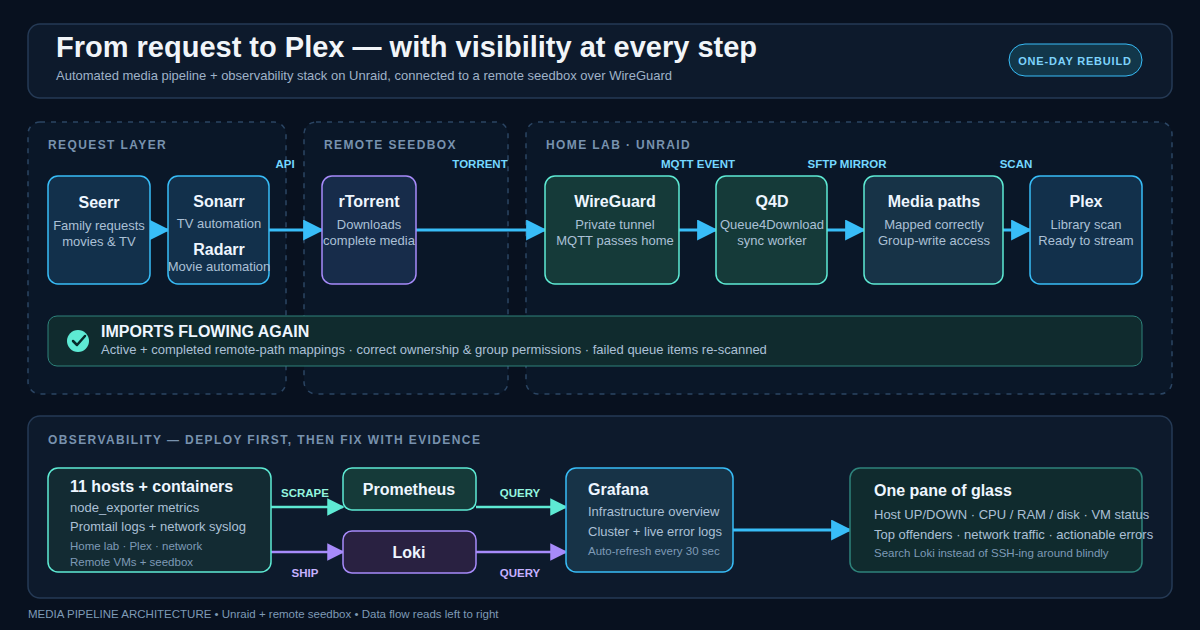
The workflow on paper: someone requests something in Seerr, Sonarr or Radarr finds it and sends it to the seedbox, the seedbox downloads it, Q4D automatically syncs it back to the NAS, Sonarr or Radarr imports it into the library, and Plex picks it up. Fully hands-off.
Except it wasn’t working. Stuff was downloading to the seedbox, Q4D was syncing it home, and then it was just sitting there. Sonarr and Radarr were failing to import, and I had no idea how long it had been going on.
The problem was I had no logging, no monitoring, and no way to see what was happening across my infrastructure without SSH-ing into individual machines and tailing logs manually. That’s not sustainable.
A Quick Note on Q4D
Q4D deserves its own post (and it’s going to get one). The short version: when rTorrent on the seedbox finishes a download, it fires a hook that publishes an MQTT event over the WireGuard tunnel back to the NAS. The Q4D Docker container on Unraid subscribes to that MQTT broker, receives the event, and uses LFTP over SFTP to mirror the completed file from the seedbox into the right download directory. Sonarr and Radarr are watching those directories and kick off the import from there.
It’s a clever design and once it’s set up correctly it’s rock solid. Getting it set up correctly has some gotchas, which is exactly why it warrants a dedicated walkthrough.
Step 1: Get Eyes on Everything
Before fixing the media stack, I needed to actually see what was going on. So I built an observability stack.
The Stack
- Prometheus — metrics collection
- Loki — centralized log aggregation
- Grafana — dashboards and visualization
- Promtail — log shipping agent on every host
Simple idea: Prometheus scrapes metrics from every host via node_exporter, Loki ingests all logs via Promtail, and Grafana gives me one place to see all of it.
Deploying Promtail to 11 Hosts
I have hosts in two locations connected by a WireGuard site-to-site VPN: home (the Unraid server, Plex, network gear) and a remote data center (a multi-node Proxmox cluster with a bunch of VMs).
The Proxmox hosts and Plex were straightforward. SSH in, drop the Promtail binary, write a systemd service, done.
The VMs were harder because I don’t have SSH keys distributed to them from the NAS. Instead I use the Proxmox API’s guest-exec feature (QEMU Guest Agent) to run commands inside VMs remotely. It works but it has some quirks:
- Every POST request needs a CSRF token
- The `arg` parameter for passing command arguments is broken in some Proxmox versions. You have to pipe scripts in via `input-data` instead
- Some VMs didn’t have `unzip` installed, so install scripts would silently fail at extraction
Once I worked through those, I had Promtail shipping logs from all 11 hosts to Loki. Including 3 public-facing VMs that Prometheus can’t scrape because there’s no inbound path from home. They can push logs outbound though, so Loki has complete coverage even where Prometheus doesn’t.
Network Device Logs
I was running a Splunk container to receive syslog from my router and switches. Total overkill. Turns out rsyslogd was already receiving those syslogs and writing them to per-device files. I just pointed Promtail at those files. Same data, way less overhead. Splunk gone.
Proxmox Cluster Metrics
For the cluster, I added pve-exporter, a small container that talks to the Proxmox API and exposes cluster-level metrics (node CPU and RAM, per-VM stats, storage pools, cluster health). Prometheus scrapes it every 30 seconds. Paired with the community PVE dashboard in Grafana, I can see the entire cluster at a glance.
The Dashboard
I built a custom “Infrastructure Overview” dashboard as a single pane of glass:
- Host status tiles — color-coded UP/DOWN for every monitored host, click to drill into full node metrics
- Cluster summary — CPU, RAM, and disk gauges across the Proxmox cluster
- Top offenders — top 5 hosts by CPU, memory, disk I/O, and network utilization
- VM table — every Proxmox VM with status, CPU, and memory usage
- Network traffic — aggregate bandwidth in/out over time
- Error log — live stream of recent errors from Loki across all hosts
One tab. Auto-refreshes every 30 seconds.
Step 2: Find the Media Import Bugs
With Loki ingesting logs from every container on the NAS, I could finally see what Sonarr and Radarr were actually complaining about. Turned out there were three separate issues stacked on top of each other.
Bug 1: Remote Path Mapping Mismatch
The seedbox runs rTorrent. When Sonarr or Radarr ask the download client “where’s this file?”, rTorrent reports the path on the seedbox where the torrent is actively downloading. Sonarr and Radarr use remote path mappings to translate that to the local path where Q4D has synced the file, but I only had a mapping for the finished path. There was no mapping for the active download path.
Every import attempt was failing because Sonarr and Radarr were looking for a remote path on the local filesystem. Obviously doesn’t exist.
The fix: Add a second remote path mapping to both Sonarr and Radarr pointing the active download directory to the local downloads folder where Q4D drops files.
The gotcha that cost me 20 minutes: Radarr sanitizes usernames in its log output. Instead of showing the real path it shows something like /home/(removed)/torrents/.... I initially used the sanitized path in the mapping. Don’t do that. Use the actual path.
Bug 2: File Permissions
With path mapping fixed, imports still failed. New error: System.UnauthorizedAccessException: Access to the path '/media/...' is denied.
Sonarr and Radarr run as a specific user and group inside their containers. A bunch of the media library directories were owned by root with no group write permission. The containers couldn’t write to their own library folders.
The fix: Find all root-owned files and directories in the media paths, fix ownership and group write permissions across the board.
This is the kind of thing that creeps in over time on Unraid. You create a directory as root, files get synced in with different ownership, and months later you’re wondering why nothing works.
Bug 3: Cached Failure State
After fixing paths and permissions, some queue items still showed as failed. Sonarr and Radarr cache the failure state. Even after the underlying issue is resolved, the queue item stays red.
The fix: Remove the stuck items from the queue (without blocklisting them) and trigger a fresh download scan. They re-detect the files, re-attempt the import, and this time it works.
After all three fixes: Sonarr queue 25 items, zero warnings. Radarr importing cleanly. Months of stuck media suddenly flowing into Plex.
Step 3: SSL for Seerr
While I was in there, Seerr was still running on plain HTTP. Friends and family type their passwords into this thing. Not great.
The Problem
Unraid’s built-in web server occupies port 80 on the NAS IP and I can’t move it, so I can’t just run certbot directly and call it a day.
The Solution: Macvlan + nginx
I spun up an nginx container on a macvlan network. This gives the container its own IP on the LAN, completely separate from the Unraid host. No port conflicts.
Unraid host IP: port 80 = Unraid web UI, untouched
nginx on its own macvlan IP: port 80 for ACME challenges, port 5056 for SSL proxy
For the initial Let’s Encrypt cert, I temporarily stopped the Unraid web server for about 5 seconds to run the HTTP-01 challenge on the NAS IP. After that, all renewals go through nginx on its own IP using webroot. Zero downtime.
The Flow
User hits https://seerr.yourdomain.com:5055
  -> Router forwards to nginx on SSL port
  -> nginx terminates SSL, proxies to Seerr over HTTP internally
  -> Seerr responds, nginx encrypts and sends back
Users see no change. Same URL, same port. Just encrypted now.
I also added a redirect so anyone hitting HTTP on the local port gets bounced to HTTPS automatically. Auto-renewal runs twice daily via cron.
What I Learned
You can’t fix what you can’t see. The media import bugs had probably been there for a while. I only found them because I built the logging stack first. Searching Loki was infinitely faster than SSH-ing into containers and grepping logs.
Problems stack. Three separate issues (path mapping, permissions, cached state) all produced the same symptom: import failed. Fix one and quit and you’re still broken.
Radarr will lie to you. The log sanitization thing is a real gotcha. If you’re copy-pasting paths from Radarr logs into configuration, double-check that (removed) isn’t hiding a username you actually need.
Macvlan is underrated. If you’re on Unraid and can’t touch the host networking, macvlan gives your containers their own real LAN IPs. It completely sidesteps port conflict headaches.
Deploy logging first, always. Next time I stand up infrastructure, Prometheus, Loki, and Grafana go in before everything else. Flying blind is how you end up with months of broken imports and no idea.
Current State
- 11 hosts shipping logs to Loki
- Prometheus scraping metrics from 9+ hosts plus the full Proxmox cluster
- Custom Grafana dashboard: one tab, full visibility
- Sonarr and Radarr importing cleanly with proper path mappings and permissions
- Seerr behind SSL with auto-renewing certificates
- Splunk retired
All configs version-controlled. All docs written. If I get hit by a bus, someone can actually rebuild this.
Not bad for a Sunday.
Up next: Queue4Download (Q4D): The Complete Setup Guide — how it works, how to configure it, and every gotcha that will bite you if you skip the docs.